The Service Statistics Report does not support IM and Presence Service and Cisco Unity Connection.
The Service Statistics Report provides the following line charts:
Cisco CTI Manager: Number of Open Devices
Cisco CTI Manager: Number of Open Lines
Cisco TFTP: Number of Requests
Cisco TFTP: Number of Aborted Requests
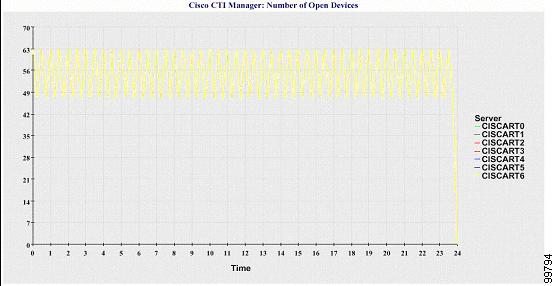
Cisco CTI Manager: Number of Open Devices
A line chart displays the number of CTI Open Devices for the CTI Manager (or for each CTI Manager in a Cisco Unified Communications Manager cluster configuration). Each line chart represents the data for the server (or on each server in a Cisco Unified Communications Manager cluster) on which service is activated. Each data value in the chart represents the average number of CTI open devices for a 15-minute duration. If no data exists, Reporter does not generate the chart. If no data exists for any one server in a Cisco Unified Communications Manager cluster configuration, Reporter does not generate the line that represents that server. The message "No data for Service Statistics report available" displays.
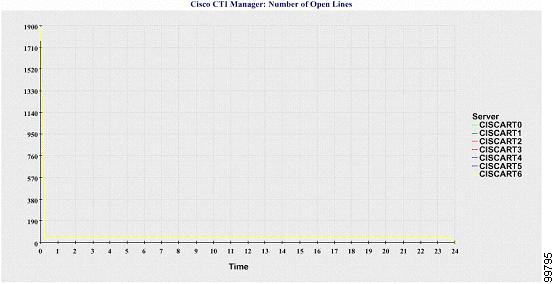
Cisco CTI Manager: Number of Open Lines
A line chart displays the number of CTI open lines for the CTI Manager (or per CTI Manager in a Cisco Unified Communications Manager cluster configuration). A line in the chart represents the data for the server (or one line for each server in a Cisco Unified Communications Manager cluster configuration) where the Cisco CTI Manager service is activated. Each data value in the chart represents the average number of CTI open lines for a 15-minute duration. If no data exists, Reporter does not generate the chart. If no data exists for any one server in a Cisco Unified Communications Manager cluster configuration, Reporter does not generate the line that represents that server.
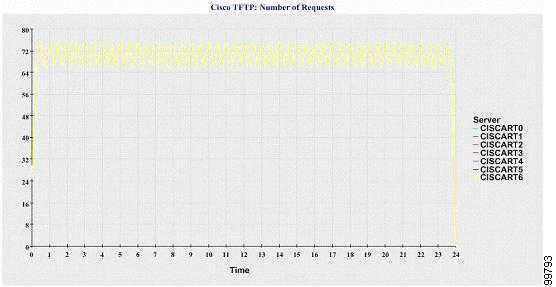
Cisco TFTP: Number of Requests
A line chart displays the number of Cisco TFTP requests for the TFTP server (or per TFTP server in a Cisco Unified Communications Manager cluster configuration). A line in the chart represents the data for the server (or one line for each server in a Cisco Unified Communications Manager cluster) where the Cisco TFTP service is activated. Each data value in the chart represents the average number of TFTP requests for a 15-minute duration. If no data exists, Reporter does not generate the chart. If no data exists for any one server in a Cisco Unified Communications Manager cluster configuration, Reporter does not generate the line that represents that server.
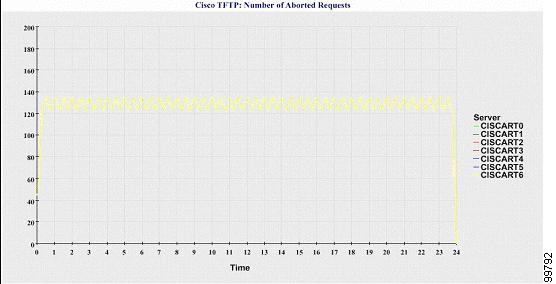
Cisco TFTP: Number of Aborted Requests
A line chart displays the number of Cisco TFTP requests that were aborted for the TFTP server (or per TFTP server in a Cisco Unified Communications Manager cluster configuration). A line in the chart represents the data for the server (or one line for each server in a Cisco Unified Communications Manager cluster) where the Cisco TFTP service is activated. Each data value in the chart represents the average of TFTP requests that were aborted for a 15-minute duration. If no data exists, Reporter does not generate the chart. If no data exists for any one server in a Cisco Unified Communications Manager cluster configuration, Reporter does not generate the line that represents that server.
The server (or each server in a Cisco Unified Communications Manager cluster) contains log files that match the filename pattern ServiceLog_mm_dd_yyyy_hh_mm.csv. The following information exists in the log file: